Monitoring Centre
The main task of the Monitoring Centre is to monitor the traffic movement on a map pseudo-3D map and aid all vehicles that enter this map to a parking space. There are several areas that the user of the MC should become accustomed to when using this system. The map is used in both the Monitoring Centre and the In-Car, and both have different ways of interacting with the map. In the Monitoring Centre the map has the cability to allow the user to move the map up, down, left and right by clicking the left mouse button and dragging in the desired direction. The user can also adjust the pitch and yaw of the map by clicking the right mouse button and dragging in the desired direction. In addition to these movements, there is also a zoom in and out function. This can be achieved by either using the mouse wheel, and scrolling up to zoom in or scrolling down to zoom out, or by using the ‘Zoom bar’ and moving the slider up or down to zoom in or out. All these methods of adjusting the map can be helpful to see components on the map that are off the edge of the screen, or just to adjust it slightly to see it better.
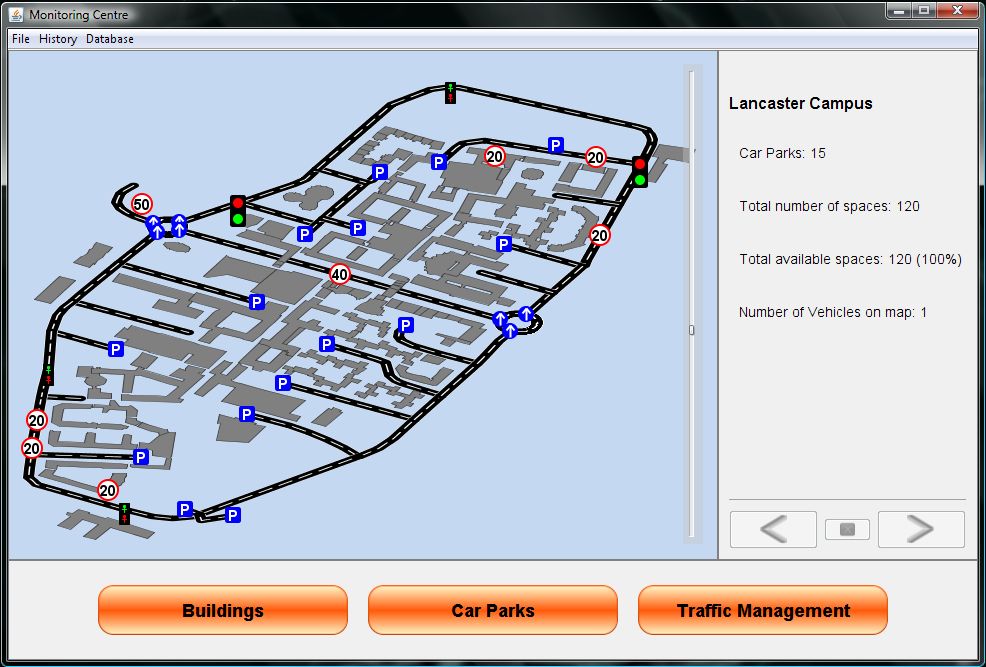
At the bottom of the interface are 3 menu buttons that enable the user to view menus in the side bar. The default panel that appears in the side-menu is the “Details Panel”; this just displays some basic information about the map being displayed. All of the menus that appear in the side bar display a list of the respected object, so the Car Park menu displays a list of Car Parks and data about them. All of the menus are exactly the same, in the respect that they just display objects, and data about the object, except the Road menu.